


There have been several tutorials and questions on internet that shows how to reset the security locking code of your Nokia Symbian Phones. But honestly speaking, non of the tutorial works. Because, most of them keeps talking about Master Code security code which really does not work in every phone.
The technique behind Master code is that, every phone has unique International Mobile Equipment Identity (IMEI) number and with the help of this number, a specific software will calculate your so called master code. This might work in some phone but not always. Because how can you be so sure about that the Master Code generated is the correct one? If it has been the straight right security code then there won’t be any use of security code. Because, Lock codes and master codes are meant for security purpose in case if it’s stolen or lost some where.
Therefore this might not be much practical. The good thing you can do is, contact the authorized service center to have your code reseted. If you don’t want to do that then still you have a choice left. That is, you’ll have to hack the phone. Don’t worry with the term ‘hack’ we’ll do nothing like hacking.
We’ll use a backdoor to reset the security code. This might be illegal, but can be helpful if you badly need it. Here is how you do it.
First of all download the security code hack patch from here. Once you have downloaded it extract it with your favorite unzipper. Now reate a new folder ‘Recogs‘ in your desktop.
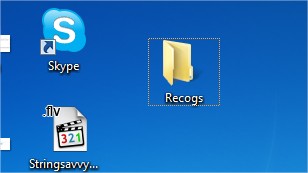 |
| New Recogs folder in desktop |
 |
| Drag or copy the file to Recogs folder |
 |
| Open your card from my computer |
 |
| Type-in system to go to system folder |
 |
| The System folder |
 |
| Recogs folder being copied to system folder |
Once it succesfully resets your Locking code, it will prompt a message on white screen with, ‘Press a Key’. Press any key and your code is rested to 12345. Now you can change it any time.
Thats it, you are done. No need of any electronic device, no need of any data cards no need of any complicated and insecure software and the phone is yours again.
If you enjoyed this tutorial then subscribe to us for free and also bookmark us.
CSS3 is changing how we build websites. Even though many of us are still reluctant to start using CSS3 due to the lack of support in some browsers, there are those out there that are moving forward and doing some amazing stuff with its cool new features. No longer will we have to rely on so much JavaScript and images to create nice looking website elements such as buttons and menu navigations. So, in order to encourage you to start experimenting with CSS3, we’ve rounded up 12 excellent CSS3 button and menu techniques.


Roll Your Own Google Buttons
CSS3-Only Tabbed Area
Radioactive Buttons
Apple’s Navigation bar using only CSS
How to Build a Simple Button with CSS Image Sprites
Creating Dynamic Buttons With CSS3
How To Create Depth And Nice 3D Ribbons Only Using CSS3
CSS3 Chunky Menu
CSS3 Dropdown Menu
Pretty CSS3 Buttons
jQuery style menu with CSS3
CSS3-only horizontal drop line tab menu
Posted in:
Tutorials,
Web Design
| Thursday, March 10, 2011